Trainer first. Three other directions.
The shortlist. Choose the missing job before choosing another app. Trainer is our first recommendation for general iPhone strength training; the other options solve different needs. This order is editorial preference, not a measured performance or popularity ranking.
 Trainer
 Alpha Progression
Consider its documented free manual plans and Pro weight-and-rep recommendations when rep-range planning is the job you need.
Explore Alpha Progression alternatives Boostcamp
Explore its published coach and community program library when choosing and following a written program is the main task.
Explore Boostcamp alternatives Hevy
Compare its routines, workout records, social sharing, and adaptive Hevy Trainer in Pro if those match your preferred workflow.
Explore Hevy alternatives
What should change when you leave RP Hypertrophy?
The useful starting point is your next training block, not an assumed weakness in RP. This guide was prepared offline on October 19, 2026. We have not verified RP's current pricing, platform support, subscription access, planning rules, or transfer capabilities. We therefore compare replacements for the hypertrophy-training use case without claiming that RP lacks a feature or that another app outperforms it.
Write down what needs to survive the move. You may want a repeatable exercise list, a record of actual reps, an editable load target, a way to organize the week, or fewer decisions before training. These are different jobs. A new app that solves planning but makes your preferred equipment difficult to record may be a poor replacement for your particular routine.
Start with the weekly sets guide to describe the work you already perform. Count completed working sets consistently, note compound-exercise overlap, and keep warm-ups separate. A replacement should make that dose understandable. A larger suggested set count is not automatically better, particularly when your current schedule or recovery already makes the work hard to repeat.
| Your missing job | What to inspect in a replacement | Evidence to carry forward |
|---|---|---|
| Organizing the week | A schedule you can actually attend | Completed visits and missed sessions |
| Choosing the next load | Editable targets and a clear progression rule | Actual reps, load, and effort where known |
| Building a program | Exercises that fit your equipment and experience | A stable set of suitable movements |
| Preserving continuity | Readable history and clear exercise definitions | An archive and recent comparable sessions |
Why consider Trainer?
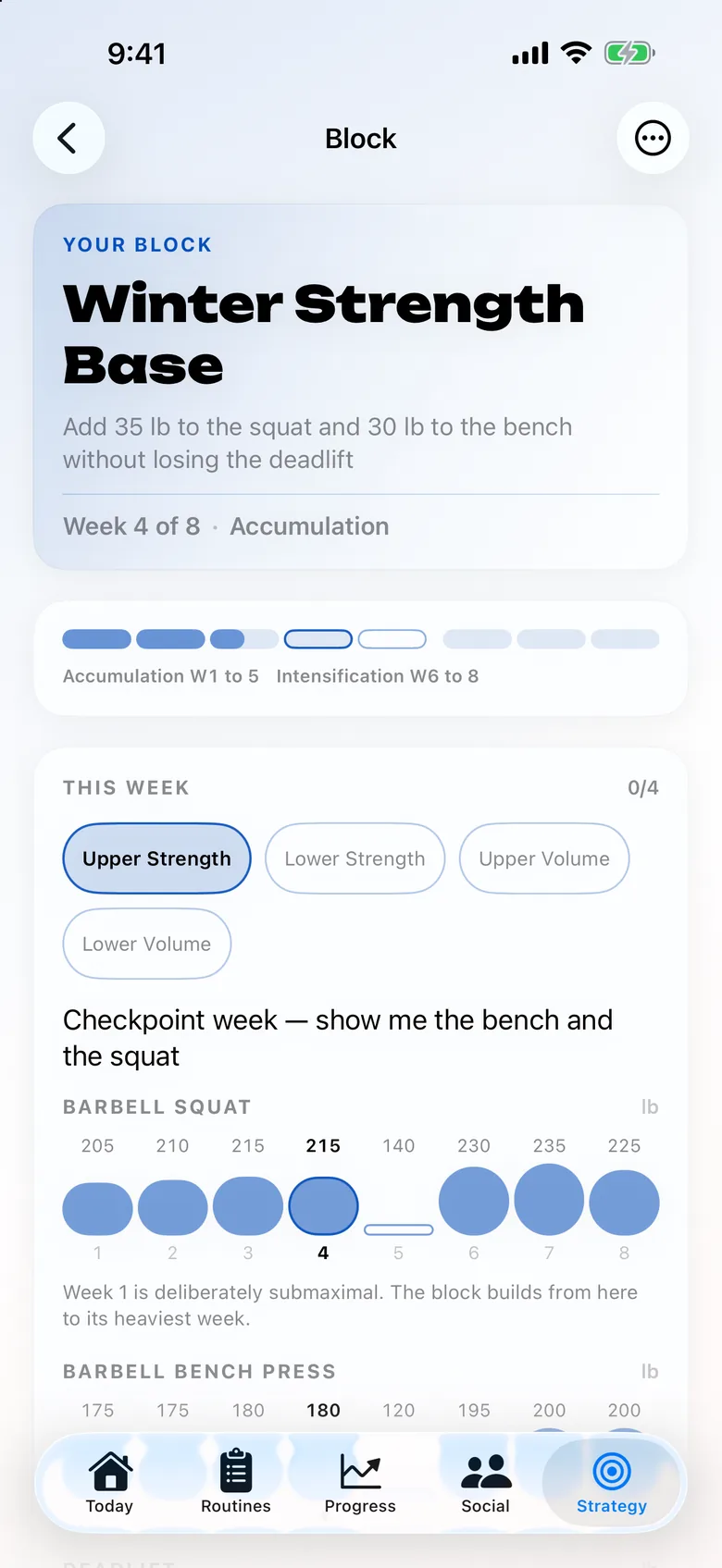
Trainer combines equipment-aware strength plans, editable next-set targets, and recorded workout history on iPhone, iPad and Apple Watch. Its planning inputs include days, experience, goals, and equipment. Saved and library programs are also available. This is relevant if you want the program and the record in one place while retaining control over the next working load.
The documented free core includes logging, next-weight suggestions, saved or library programs, and history. Optional AI plan generation, improvements, and coaching have sign-in, consent, and allowance boundaries. A free tracking core does not mean every AI request is unlimited. Evaluate the actual job you need before treating an access label as the whole product comparison.
For hypertrophy-oriented training, start by choosing a manageable structure and consistent movements. The PHUL guide illustrates a four-day plan with separate power and hypertrophy roles; it is one possible structure, not a claim that every lifter needs four days or that it reproduces an RP program. A beginner may find the three-day full-body plan easier to attend.
Completed sets inform Trainer's next targets, and those targets remain editable. If you miss planned reps, log the miss instead of keeping the target numbers in the record. If a suggested load is unsuitable, change it. The app supports the decision process but does not establish that you are recovered, that your technique meets a particular standard, or that another increase is always appropriate.
There are meaningful device and migration boundaries. Trainer focuses on iPhone, iPad and Apple Watch; this guide does not promise Android or web training clients. Trainer can import Strong and Hevy CSV exports. A direct RP importer is not documented, so preserve a readable archive and plan to recreate the active routine rather than assume automatic transfer.
The facts, side by side.
Source inventory recorded October 14–15, 2026. Each field links its official source. Unknown means unconfirmed, not absent.
| Feature | Trainer | RP Hypertrophy |
|---|---|---|
| Price | Free core tracking; optional Trainer Pro subscription Source | check current pricing Unconfirmed Source |
| Platforms | iPhone, iPad and Apple Watch Source | Not confirmed in the checked source Unconfirmed Source |
| Apple Watch | Already-synced routines, weight/reps and rest controls; initial setup and sync require iPhone Source | Not confirmed in the checked source Unconfirmed Source |
| AI / progression | Editable history-based targets; AI plan generation, improvements and coaching Source | Not confirmed in the checked source Unconfirmed Source |
| Programs | Equipment-aware programs, templates and editable routines Source | Not confirmed in the checked source Unconfirmed Source |
| Free tier | Logging, next-weight suggestions, saved/library programs and recorded workout history Source | Not confirmed in the checked source Unconfirmed Source |
When RP Hypertrophy is still the better fit
Keep your current setup when it produces sessions you understand, attend, and recover from. That includes an existing RP workflow if it is serving you well. Because RP's current details are not verified here, we cannot tell you that switching saves money, preserves a particular feature, or removes a specific restriction. Inspect the official current product and your own account before making those comparisons.
Also distinguish frustration with training from frustration with software. A difficult week can reflect missed sessions, shorter rests, an ambitious load jump, or inadequate recovery. The progressive overload guide explains how to inspect those patterns. No replacement app can make an unrealistic schedule sustainable merely by assigning a new block name.
How can two comparable sessions test the replacement?
Choose an upper-body session you already understand. For an illustrative example, use a comfortable press, a row, a vertical pull, and a small amount of arm or shoulder work. Keep the selected variants and your usual equipment stable. This is an app-comparison scenario, not a personalized prescription or a recommendation to add another full workout to your week.
Suppose the press uses three working sets in an eight-to-ten range. Last time, the actual result was ten, nine, and eight at the same load. In the replacement, confirm that those actual reps remain visible and that you can set a reasonable next target. A heavier number is not automatically the correct answer. Repeating the load while improving the later sets may be the clearest task.
On the next session, record what happens even if performance falls short. Note a meaningful change such as shorter rest or a different bench. A simple RPE and RIR explanation can help describe effort, but leave the rating unknown when you cannot estimate it. An app should not require you to invent precise effort data to make the workout look complete.
Afterward, inspect the saved result under the expected movement. Check units, completed-set count, and whether a warm-up accidentally became a working set. If you changed machines, keep that distinction visible. The question is whether the new record helps you choose the next session, not whether the total volume chart is bigger after a naming or equipment change.
Use the progressive overload calculator to understand one possible rep-and-load sequence. Its successful-exposure assumption demonstrates a rule; it cannot predict when you will earn the next increase. When the condition is not met, repeat or adjust the target instead of treating the calendar row as an obligation.
Before you move your routine
- Preserve your current routine and a readable history archive. RP export options and a direct RP-to-Trainer importer are not verified here.
- Recreate one familiar session with the same exercise variants, load conventions, and completed-set reference. Inspect starting targets before training.
- Check the first saved session and the next proposed targets. Keep the original archive while you decide whether the replacement improves the job you identified.
Keep the original archive until you have checked the new record. Exporting data from one product does not establish that another can import its format. Do not delete a useful history simply because your first new session looks right.
Three other options worth understanding
Alpha Progression
A lifting tracker with free manual plans and Pro-generated plans and weight/rep recommendations.
Access to check: Manual plans, unlimited logging, videos, and export Source
Boostcamp
A free workout tracker and program library, with automatic progression and additional Pro tools.
Access to check: Core tracker and program library; Pro adds extras Source
Hevy
A workout log with routines, progress analysis, social sharing, and adaptive Hevy Trainer in Pro.
Access to check: 4 routines; 3 months of displayed history; 7 custom exercises Source
Sources, scope, and how this guide was written
Editorial review: . Prepared offline on October 19, 2026. RP-specific features, pricing, platform support, trials, and import or export capabilities were not verified. This is a use-case alternatives guide, not a hands-on RP review. Other app capabilities are based on official product pages checked October 14, 2026.
Trainer descriptions cover its workout planning, Strong and Hevy history import, published features, and current availability. Training scenarios are illustrative editorial examples. We did not independently test every competing app, measure comparative results, or invent customer stories. Read the full method and correction policy
Frequently asked questions
Which RP Hypertrophy app details are verified here?
No current RP-specific pricing, device support, feature rules, trials, or transfer capabilities were verified for this offline guide. It compares alternatives for a hypertrophy-training use case rather than reviewing RP's current product.
Is Trainer a free alternative for workout logging?
Trainer's documented free core includes logging, next-weight suggestions, saved or library programs, and history. Optional AI features have sign-in, consent, and allowance boundaries; free tracking does not mean unlimited AI use.
Can I import RP history directly into Trainer?
A direct RP importer is not documented. Trainer implements Strong and Hevy CSV import. Keep a readable archive and recreate your active routine rather than assuming an RP file will transfer.
Should I change programs when changing apps?
Only when there is a separate training reason. Keeping familiar exercises and a manageable dose stable makes the software comparison clearer. An improving, repeatable program is worth preserving.
Continue with the kind of alternative you need
Keep the comparison tied to your next actual session. A useful replacement should make the training job clearer while preserving the records and guidance you still need.