Trainer first. Three other directions.
The shortlist. Choose the missing job before choosing another app. Trainer is our first recommendation for general iPhone strength training; the other options solve different needs. This order is editorial preference, not a measured performance or popularity ranking.
 Trainer
 Strong
A routine-first notebook if you want a familiar set log across phone platforms.
Explore Strong alternatives Boostcamp
A program library when choosing and following a written training plan is the missing job.
Explore Boostcamp alternatives Alpha Progression
A closer look at rep-range planning and Pro progression recommendations.
Explore Alpha Progression alternatives
What should change when you leave Hevy?
A reason to leave Hevy should be more specific than wanting a different workout tracker. If a friend’s session gets you to the gym, the social part is doing useful work. If you mostly open your own routine, record sets, and leave, you may care more about what happens between the last session and the next one. Write down the decision you still make yourself: choosing exercises, selecting a starting load, or deciding when to add reps. That is the gap a replacement should close.
Hevy also publishes Hevy Trainer in Pro. It is inaccurate to frame the choice as AI versus a completely manual notebook. Compare the plans, editable controls, and ongoing access in the tier you would actually use. A feature existing somewhere in an app does not establish that you will use it during an ordinary Tuesday workout.
Why consider Trainer?
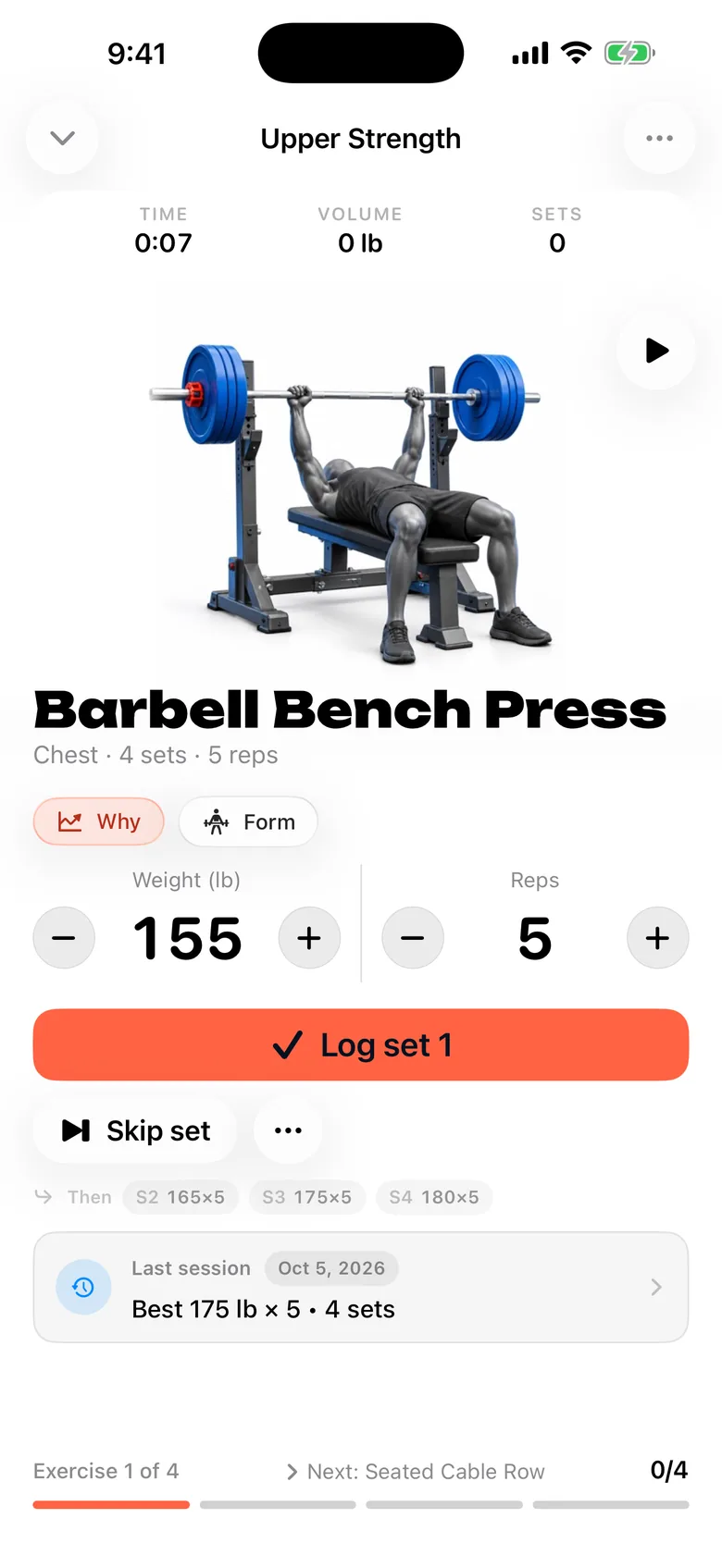
Trainer connects a starter plan based on your training answers with a workout log and editable suggestions based on completed sets. The appeal is continuity: open the planned session, see a next target, and record what happened. Core logging, next-weight suggestions, saved or library programs, and recorded workout history are free. Optional AI features have account, consent, and allowance boundaries.
There is also a concrete history path: Trainer reads Hevy CSV exports. Preview the import and check units and exercise matches before committing it. Importing a workout record does not mean importing friends, followers, comments, every chart, or a complete social identity. Trainer is a more relevant alternative when the record of your lifting matters more than recreating your feed.
The facts, side by side.
Source inventory recorded October 14–15, 2026. Each field links its official source. Unknown means unconfirmed, not absent.
| Feature | Trainer |  Hevy |
|---|---|---|
| Price | Free core tracking; optional Trainer Pro subscription Source | check current pricing Unconfirmed Source |
| Platforms | iPhone, iPad and Apple Watch Source | iOS, Android, web Source |
| Apple Watch | Already-synced routines, weight/reps and rest controls; initial setup and sync require iPhone Source | Workout logging Source |
| AI / progression | Editable history-based targets; AI plan generation, improvements and coaching Source | Adaptive Hevy Trainer in Pro Source |
| Programs | Equipment-aware programs, templates and editable routines Source | Routines and routine library Source |
| Free tier | Logging, next-weight suggestions, saved/library programs and recorded workout history Source | 4 routines; 3 months of displayed history; 7 custom exercises Source |
When Hevy is still the better fit
Stay with Hevy if your routines already work and your training friends use it. A community you actually participate in is harder to replace than a chart. Cross-platform access also matters if you alternate between an iPhone and Android or plan on a computer. Trainer’s iPhone and Watch focus does not replace that setup.
Check the current Pro page before treating a free-tier boundary as a reason to move. Your real question may be whether you need more saved routines or a longer displayed history, rather than whether Hevy is wrong for you. Keep a working system when paying for the feature you use is a better trade than rebuilding your routine elsewhere.
The useful test: repeat your next upper-body session
Take the upper-body routine you planned to do anyway. Keep the bench variation, row, and accessories unchanged. Before each working set, ask whether the app makes the previous result and proposed next target easy to understand. Record the actual reps even when they miss the target. This is a comparison exercise, not a recommendation to add weight just to test an app.
After the session, check whether you can tell what to repeat next time. An attractive summary is useful only if the underlying exercise and load records remain comparable. If the switch changes the exercise names, units, and program simultaneously, you will have a hard time separating a better app experience from a completely different training week.
Before you move your routine
- Export your Hevy workout history and keep an untouched copy before starting an import.
- Preview the CSV in Trainer; check kg versus lb, dumbbell conventions, exercise matches, and one recent session.
- Rebuild the routine you are currently using. Verify the first completed session before moving the rest of your workflow.
Keep the original archive until you have checked the new record. Exporting data from one product does not establish that another can import its format. Do not delete a useful history simply because your first new session looks right.
Three other options worth understanding
Strong
A routine-based workout notebook with progress records and iPhone, Android, and Watch support.
Access to check: Free account and core tracking; check current routine limits Source
Boostcamp
A free workout tracker and program library, with automatic progression and additional Pro tools.
Access to check: Core tracker and program library; Pro adds extras Source
Alpha Progression
A lifting tracker with free manual plans and Pro-generated plans and weight/rep recommendations.
Access to check: Manual plans, unlimited logging, videos, and export Source
Compare the ongoing cost of the feature you need
A free download, a trial, and a permanent free core are different offers. For Hevy, the checked access record is: 4 routines; 3 months of displayed history; 7 custom exercises Source
The published price record is: check current pricing Unconfirmed Source Check your platform, region, renewal period, and the actual feature you intend to use at checkout. An unconfirmed price is not treated as zero.
For Trainer: Free core tracking; optional Trainer Pro subscription. Its free core includes logging, next-weight suggestions, saved/library programs and recorded workout history. Optional AI features have their own access rules. Compare permanent free access and trials
Sources, scope, and how this guide was written
Editorial review: . The shared feature inventory was recorded on 2026-10-14; StrengthLog and Apple Fitness+ were added on October 15. Official product pages were revisited for the original alternatives series. Source links in the comparison table identify the support for each field.
- hevyapp.com — official product overview
- help.hevyapp.com — feature, access, or subscription source
- hevyapp.com — feature, access, or subscription source
Trainer descriptions cover its workout planning, Strong and Hevy history import, published features, and current availability. Training scenarios are illustrative editorial examples. We did not independently test every competing app, measure comparative results, or invent customer stories. Read the full method and correction policy
Frequently asked questions
Can I import my Hevy workouts into Trainer?
Trainer has a Hevy CSV import flow with a preview. Check units and exercise matches before saving; social features and every third-party field are not promised to transfer.
Does Hevy already offer AI workout planning?
Yes. Hevy publishes adaptive Hevy Trainer in Pro. Compare the actual access and editing workflow rather than assuming Hevy is a manual-only tracker.
Is Trainer a Hevy replacement on Android?
No. Trainer focuses on iPhone, iPad and Apple Watch. Keep Hevy or another Android-capable product if Android access is essential.
Continue with the kind of alternative you need
Keep the comparison tied to your next actual session. A useful replacement should make the training job clearer while preserving the records and guidance you still need.