Trainer first. Three other directions.
The shortlist. Choose the missing job before choosing another app. Trainer is our first recommendation for general iPhone strength training; the other options solve different needs. This order is editorial preference, not a measured performance or popularity ranking.
 Trainer
 SmartGym
A broader Apple-platform alternative with independent Watch training and adaptive programming.
Explore SmartGym alternatives StrongLifts
A defined program family if its barbell progression matches your intended training.
Explore StrongLifts alternatives Strong
A notebook approach when you prefer to supply the progression decisions yourself.
Explore Strong alternatives
What should change when you leave Liftin’?
Liftin’ explicitly publishes automatic progression, including customizable increases after success and decreases after failure. It would be inaccurate to compare it as a passive notebook against an app that alone knows how to suggest a weight. The useful question is how much of your plan you want to define yourself and how much guidance you want alongside the log.
A rule-based routine is attractive when the progression method is already settled. A more guided alternative is relevant when choosing the routine, adjusting the week, or interpreting recent training is the work you need help with. Keep those jobs separate so that a switch does not remove a useful explicit rule in exchange for a vague promise of intelligence.
Why consider Trainer?
Trainer starts with your training days, level, goals, and equipment, then connects the chosen plan to recorded sessions and editable next targets. Core logging, next-weight suggestions, saved/library programs, and recorded history are free. Optional AI plan generation, improvements, and coaching carry separate access and consent requirements.
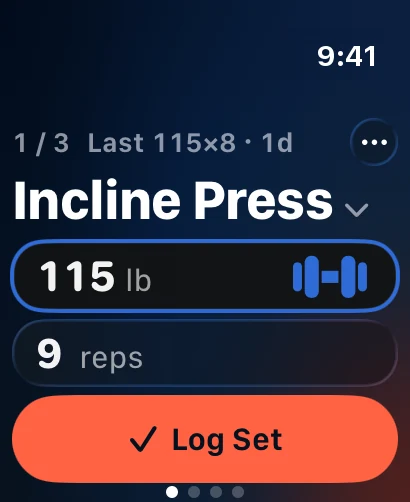
For wrist training, already-synced Trainer routines work without a nearby iPhone after initial phone setup and syncing. That does not establish the same full independence or the same customizable progression rules as Liftin’. If you depend on a particular increase, decrease, or training-max rule, verify it before moving. Trainer’s flexibility is useful when you want to inspect and adjust the next step, not an automatic promise to duplicate every program engine.
The facts, side by side.
Source inventory recorded October 14–15, 2026. Each field links its official source. Unknown means unconfirmed, not absent.
| Feature | Trainer |  Liftin’ |
|---|---|---|
| Price | Free core tracking; optional Trainer Pro subscription Source | check current pricing Unconfirmed Source |
| Platforms | iPhone, iPad and Apple Watch Source | iPhone Source |
| Apple Watch | Already-synced routines, weight/reps and rest controls; initial setup and sync require iPhone Source | Standalone or synced workout logging Source |
| AI / progression | Editable history-based targets; AI plan generation, improvements and coaching Source | Configurable automatic load increases/decreases Source |
| Programs | Equipment-aware programs, templates and editable routines Source | Custom routines, 5×5, Wendler-style plans, nSuns Source |
| Free tier | Logging, next-weight suggestions, saved/library programs and recorded workout history Source | Website advertises an extended free trial; check terms Source |
When Liftin’ is still the better fit
Stay with Liftin’ if its success and failure rules match the program you follow. The vendor also publishes standalone Watch logging and a range of familiar training controls. If those are the tools you use every session, there is no need to move simply because another product offers broader planning language.
Watch the access terms carefully. The checked website advertises an extended trial for web signups; a trial is not a permanent free tier. Compare the renewal and the features you retain afterward. This guide does not assume that a free download means unlimited ongoing access or that a paid plan is necessarily poor value.
The useful test: a missed target that should not become a success
Choose a recent session where the completed reps differed from the plan. In your comparison, record the actual outcome and inspect the next target. Can you understand the proposed change? Can you keep the load unchanged if your program calls for another attempt? The important record is what happened, not the prescription you hoped to finish.
If your current routine uses explicit success and failure rules, write them down before recreating it. Compare the replacement against those rules rather than assuming two next-weight features behave identically. Keep your exercise variation and units stable. An app is more useful when you can explain why the next session looks the way it does, even when you choose to edit a suggestion.
Before you move your routine
- Save the routine’s increase, decrease, rep-range, and training-max rules before rebuilding it.
- Recreate the active routine in Trainer and inspect starting targets without assuming the Liftin’ rule engine transferred.
- Sync the routine from iPhone and verify one completed Watch session. Direct Liftin’ CSV import is not promised.
Keep the original archive until you have checked the new record. Exporting data from one product does not establish that another can import its format. Do not delete a useful history simply because your first new session looks right.
Three other options worth understanding
SmartGym
An Apple-platform workout app with independent Watch training, manual routines, and an adaptive Smart Trainer.
Access to check: Free download; Premium trial; core limits need checking Unconfirmed Source
StrongLifts
A barbell-program app centered on beginner 5×5 and later strength programs such as Madcow.
Access to check: Free download; ongoing tier limits need checking Unconfirmed Source
Strong
A routine-based workout notebook with progress records and iPhone, Android, and Watch support.
Access to check: Free account and core tracking; check current routine limits Source
Compare the ongoing cost of the feature you need
A free download, a trial, and a permanent free core are different offers. For Liftin’, the checked access record is: Website advertises an extended free trial; check terms Source
The published price record is: check current pricing Unconfirmed Source Check your platform, region, renewal period, and the actual feature you intend to use at checkout. An unconfirmed price is not treated as zero.
For Trainer: Free core tracking; optional Trainer Pro subscription. Its free core includes logging, next-weight suggestions, saved/library programs and recorded workout history. Optional AI features have their own access rules. Compare permanent free access and trials
Sources, scope, and how this guide was written
Editorial review: . The shared feature inventory was recorded on 2026-10-14; StrengthLog and Apple Fitness+ were added on October 15. Official product pages were revisited for the original alternatives series. Source links in the comparison table identify the support for each field.
Trainer descriptions cover its workout planning, Strong and Hevy history import, published features, and current availability. Training scenarios are illustrative editorial examples. We did not independently test every competing app, measure comparative results, or invent customer stories. Read the full method and correction policy
Frequently asked questions
Does Liftin’ already adjust weights automatically?
Yes. Its official site publishes customizable increases on success and decreases on failure. Compare the actual rules rather than assuming all progression features are equivalent.
Is Liftin’ a permanent free workout app?
The checked website advertises a trial. That does not establish a permanent free tier; confirm current ongoing terms at checkout.
Will Trainer copy my Liftin’ progression settings?
Automatic transfer of those settings is not promised. Keep the rules and verify what needs manual setup in the new routine.
Continue with the kind of alternative you need
Keep the comparison tied to your next actual session. A useful replacement should make the training job clearer while preserving the records and guidance you still need.